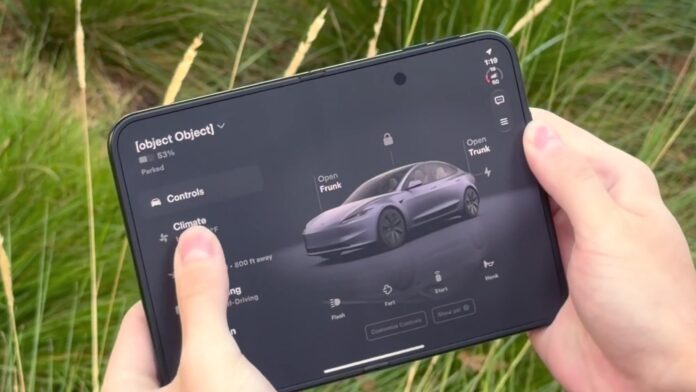

The Tesla app finally has a layout built for big screens. Version 4.62 brings a two-column design to the iPad, Apple’s new iPhone Duo foldable and Android tablets and foldables, with a large, in-car-style 3D view of your vehicle on the right and the menu on the left. Tesla made it official on X on Friday night with a short clip titled “Tesla app now on the big screens.” Dig into the code, and the same update hints at FSD referral rewards and X Money payments.
Tesla posted the video at 9:01 PM ET / 6:01 PM PT Friday, Oct. 23 (10:01 AM JST Saturday). It shows someone opening a foldable phone in a field of tall grass, and the app spreading across the inner screen.
One small detail for the sharp-eyed: the car name in Tesla’s own demo reads “[object Object],” a classic placeholder bug. It’s a promo clip, not your account, but it’s a reminder that this is a fresh build.
Tesla also put the clip on YouTube as a Short, titled “Tesla App, Big Screens.” It shows the new two-column layout filling a foldable’s inner screen: watch it on YouTube.
What changes on a tablet or foldable
Not a Tesla App walked through the redesign when the rollout started on Oct. 21. Until now, the iPad just ran a stretched copy of the phone app. The new version puts the main menu on the left (Controls, Climate, Location, Self-Driving, Summon, Charging, Set Schedules, Security & Drivers and Safety Score) along with quick status details such as cabin temperature and how much of your driving was on FSD. Open a section like Charging and its submenu stays on the left while the details fill the rest of the screen, so you don’t lose your place.
The vehicle view on the right is the star. It’s more detailed than the phone app’s 3D model and looks a lot like the parked-car view inside the vehicle, with an ambient background that matches your paint color and reflections on the ground. You can open the frunk or trunk, lock or unlock and check charging right from the picture. Underneath sit quick controls (Flash, Honk, Start, Vent), a new Customize Controls button and a Show PSI button that puts tire pressures on the image.
Energy owners get the treatment too. The Home Status screen shows a 3D house with live readings for solar, Powerwall, home use, the grid and the car charging in the garage. Charge Stats gets a full-width map of the Superchargers you’ve used plus totals for energy, money spent and money saved versus gas.
Tesla UI engineer Alex Guichet, quoted by Not a Tesla App, said the designers “rethought many screens across the app to fill a bigger size” and warned that it’s a slow rollout that “may take an extra week or two for everyone to get it.” His summary: “our app is bigger than you imagine.” MacRumors notes that apps need to be built with the iOS 27.1 SDK or later to fill the iPhone Duo’s inner display (unoptimized apps get black borders), and that version 4.62.0 is on the App Store for iPhone, iPad and Apple Watch. The Duo itself went on sale Friday, Oct. 23. According to Not a Tesla App’s 4.62 release notes, not every panel uses the bigger screen yet, but the major ones do: Climate, Location, Self-Driving, Summon and Charging.
Hidden in the code
The 4.62 notes also list features that aren’t switched on yet, so treat these as signs rather than launches.
- FSD referrals: new strings suggest that referring someone who subscribes to FSD will earn a free month or months of FSD for a car on your account, complete with a referral “coin” graphic. One phrase reads, “If someone subscribes with your link, pick which vehicle gets the reward.”
- X Money: code points to X Money as a payment method for the Tesla Shop, Supercharging or an FSD subscription.
- Wall Connector sharing: you’d be able to share a Wall Connector with up to five people without handing over your whole Tesla Energy site, which includes your address and Powerwall controls.
- Virtual Queue: small tweaks to the Supercharger queue feature Tesla is testing at five U.S. sites.
The Japan angle
The app is global, and Guichet didn’t mention any regional limits on the rollout, so owners in Japan with an iPad or an Android foldable should see the new layout as it reaches their account. Tesla hasn’t said anything about country-by-country timing, though. The FSD referral piece is a different story: FSD (Supervised) still isn’t approved in Japan, so a free month of it would be a hard reward to collect here. Tesla Japan’s president has said he’s pushing for an approval, and Japanese owners are keeping score.
This is the latest in a run of Tesla software news this week, after the company said it’s building its own AI-based maps. Vehicle firmware hasn’t moved: the newest car update is still 2026.38.5.10 with FSD v14.3.13.
Sources: Tesla on X, Not a Tesla App (big-screen app), Not a Tesla App (app 4.62 release notes), MacRumors, Alex Guichet on X.
— The EVX News team
Featured image: The Tesla app’s big-screen layout on a foldable phone, a frame from Tesla’s Oct. 23, 2026 video. Image: Tesla, via @Tesla on X (official video frame, cropped).

