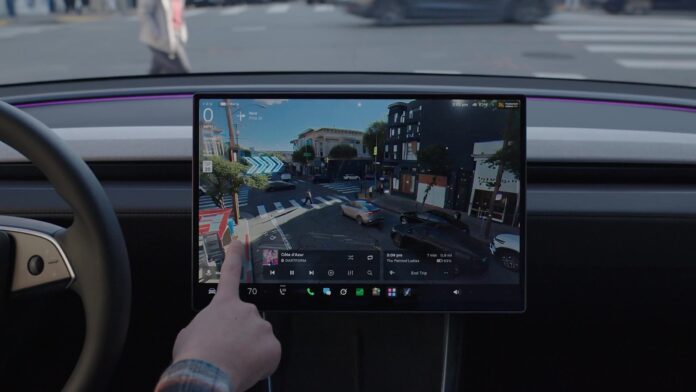


Tesla started rolling out Full Self-Driving (Supervised) v15 on Saturday, and the headline feature is something you can actually see: Tesla Reality View, a live, realistic rendering of the street around your car that also shows what FSD plans to do next. Tesla announced it on X on Saturday, Nov 21 at 2:24 PM ET / 11:24 AM PT (Sunday, Nov 22 at 4:24 AM JST). See Tesla’s post on X.
FSD v15 now starting to roll out – upgrading every part of the end-to-end driving network
— Tesla (@Tesla) November 21, 2026
Safety
25x better handling of safety critical cases
Tesla Reality View
Adds a live visualization of the drive that lets you see & control what FSD is planning to do
Lead image: a frame from Tesla’s FSD v15 video. Image: Tesla via X.
Watch the 47-second clip and you’ll see why people are losing it. The center screen no longer shows the familiar gray blobs and stock car models. It shows the actual street: buildings with windows, crosswalk stripes, parked cars, a pedestrian stepping off the curb, all lit like a night drive in a big-budget video game. In one cockpit shot the real crosswalk outside the windshield and the rendered one on the screen line up almost perfectly.
Tesla’s release notes, posted by its Tesla Super Intelligence account and reproduced in full by Teslarati, describe Reality View as a “real-time generative driving visualization that continuously streams a view from an arbitrary virtual camera situated above your vehicle.” Drivers can pick a fullscreen visualization, a map, a split view, or a quiet mode for a calmer cabin. Upcoming navigation turns appear right in the scene, and turn signals get quieter and fade out after a few clicks.
It isn’t only eye candy. Tesla VP of AI Software Ashok Elluswamy wrote on X that the same end-to-end driving model renders the view, and that “it’s not there just because it looks cool, but it also communicates the intent of the car.” The arrows show the turns FSD intends to take and pins show where it plans to park, as Drive Tesla Canada reported. He also said the new view uses less compute than the old wireframe one did. Tesla’s notes say the same thing: one end-to-end visualization replaces all the separate model signals, using less total compute.
Musk had teased this a few hours earlier. Not a Tesla App caught him saying the new interface “will re-render reality in a mind-bending way. Hard to describe, but it’s awesome.” He also said v15 goes to wide release next month, with the holiday update.
Every FSD v15 improvement, in plain English
Everything below comes from Tesla’s release notes or official posts unless marked.
- Tesla Reality View. A live, realistic picture of the road around you, viewed from a virtual camera above the car, with the car’s planned moves drawn in. What it means: you can see what the car sees and what it’s about to do, instead of guessing.
- Display choices. Fullscreen visualization, map, split view, or a quiet mode. What it means: show as much or as little as you like. Sawyer Merritt noticed you can swipe between Reality View and the map.
- Turns shown in the scene. Upcoming navigation turns appear right in the visualization. What it means: big arrows on the road ahead, so you don’t have to glance at a separate map.
- Tap to go (per Musk). Musk posted that you can tap any point on the view to make your car go there. It isn’t spelled out in the release notes. What it means: point at a spot on the screen and the car heads there.
- Less compute for the visuals. One end-to-end visualization replaces the old separate signals and uses less total compute. What it means: the prettier picture doesn’t steal brainpower from driving.
- Safety: 25x on critical cases. A new vision encoder shared with Robotaxi and Optimus, trained on millions of internet videos, improves the critical intervention rate by 25x, Tesla says. What it means: by Tesla’s numbers, far fewer moments where you’d have to grab the wheel to avoid trouble. You’ll mostly notice it across many drives, not one.
- Learned navigation. Route choices for the start and end of trips now come from fleet route preferences. Later v15 releases extend it to the whole route. What it means: the car leaves and arrives the way local drivers actually do, not just the way the map says.
- Smarter parking spots. Uses your own parking history and shows several parking options on the map at your destination. What it means: it learns where you like to park and lets you pick.
- Better detection. Road signs, small animals, debris, chains, potholes, road details, and deep standing water. What it means: fewer surprises from things on the road, and fewer pothole-sized bills.
- Speed handling. Improved for each driver profile, school zones, speed limits and bad weather. What it means: slows down where people expect it to.
- Speed Camera Slowdown. FSD can slow down for speed cameras. Press the accelerator to cancel, and after two cancels at the same camera it remembers. What it means: fewer tickets, and you stay in control.
- Bike Rack Mode. FSD works with a bike rack or similar hitch accessory. It pulls over near your destination and won’t reverse. What it means: weekend bike trips no longer mean driving yourself.
- Driver monitoring. Camera-based attention checks work more often with hats and sunglasses, and are less strict in higher-speed driver profiles. What it means: fewer annoying nags, but you still have to pay attention.
- Autoshift. Now unified with FSD’s own gear predictions. What it means: the car should pick Drive or Reverse more reliably on its own.
- Quieter turn signals. They fade out after a few clicks. What it means: less tick-tick-tick in the cabin.
Community reactions
The Tesla crowd on X had the same reaction Lester did. Musk himself kept it short:
It’s like GTA
— Elon Musk (@elonmusk) November 21, 2026
Nic Cruz Patane went straight to the comparison everyone was making:
Tesla just delivered their own version of GTA 6 with the new FSD V15 UI.
— Nic Cruz Patane (@niccruzpatane) November 21, 2026
This is real-time AI video generation of the world around you while you drive.
Dirty Tesla focused on the camera angle and the turn arrows:
Tesla’s new Reality View
— Dirty Tesla (@DirtyTesLa) November 21, 2026
Generates the world around you, viewable from any angle you please
Displays upcoming turns/navigation directly over the rendered world
And Sawyer Merritt spotted how you get around the new screens:
With FSD V15, you can switch between the new Tesla Reality View or the map view just by swiping on the screen. Looks like you can also select quiet mode on the bottom left (little moon icon)
— Sawyer Merritt (@SawyerMerritt) November 21, 2026
Who gets it, and when
This first wave is small. Elluswamy posted that v15 is “releasing to the first wave of customers today,” and Musk has pointed to a wider release in December. Tesla hasn’t said how many owners are in the first wave or which countries come first, and it hasn’t listed which cars get Reality View. Drive Tesla Canada expects it to be limited to newer HW4 (AI4) cars. Treat that as a best guess until Tesla says so.
The EVX Take
Showing the driver what the car is about to do, in a picture that looks like the street out the window, is the smartest supervision tool Tesla has shipped in a while. You don’t have to decode a gray box to know the car sees that pedestrian. For Japan, though, there’s a catch. FSD (Supervised) still isn’t approved here, and Tesla lists Reality View as part of FSD v15. No source we’ve seen says it will reach cars running only Autopilot or Autopark in Japan, so Japanese owners shouldn’t expect it in their next update. If Tesla ever does bring the rendering to non-FSD cars, Tokyo’s crowded crosswalks would be the perfect showroom.
Lester’s take
The visualizations are game changing. Mind blowing, next level. Honestly GTA 6-like. Now, owners in Japan have a running joke: every shiny new Tesla feature gets listed with the same little tag: “Not relevant in Japan.” So here are two more for the list:
New UI visualization: Not relevant for Intel Atom cars.
FSD V15: Not relevant for HW3.
For the record, Drive Tesla Canada expects Reality View on HW4 cars with the newer AMD Ryzen computer, and HW3 is still on its own FSD v14.3 Lite build, per Not a Tesla App. And FSD v15 here in Japan? You already know. Not relevant in Japan.
Follow @teslaloha on X for more